If you're upgrading from an older version of Coinomi to version 2.0.0 or later, you'll need to migrate your existing wallets to the updated encryption format. This is a straightforward process that keeps your wallets, recovery phrases, accounts, and cryptocurrency unchanged.
Your wallets and funds remain unchanged
Migration does not create new wallets, change your recovery phrases, generate new addresses, or move your cryptocurrency. It simply updates how Coinomi encrypts and stores your existing wallet information.
Why is wallet migration required?
Coinomi 2.0.0 introduces an updated method for securely encrypting wallet information on your device's storage. Wallets created in older versions use the previous encryption format. To continue using them in Coinomi 2.0 and later, the app needs to unlock and re-encrypt their information using the updated format.
This process is completely local. It takes place within the app and does not involve transferring funds on the blockchain.
1. Migrating your existing wallets
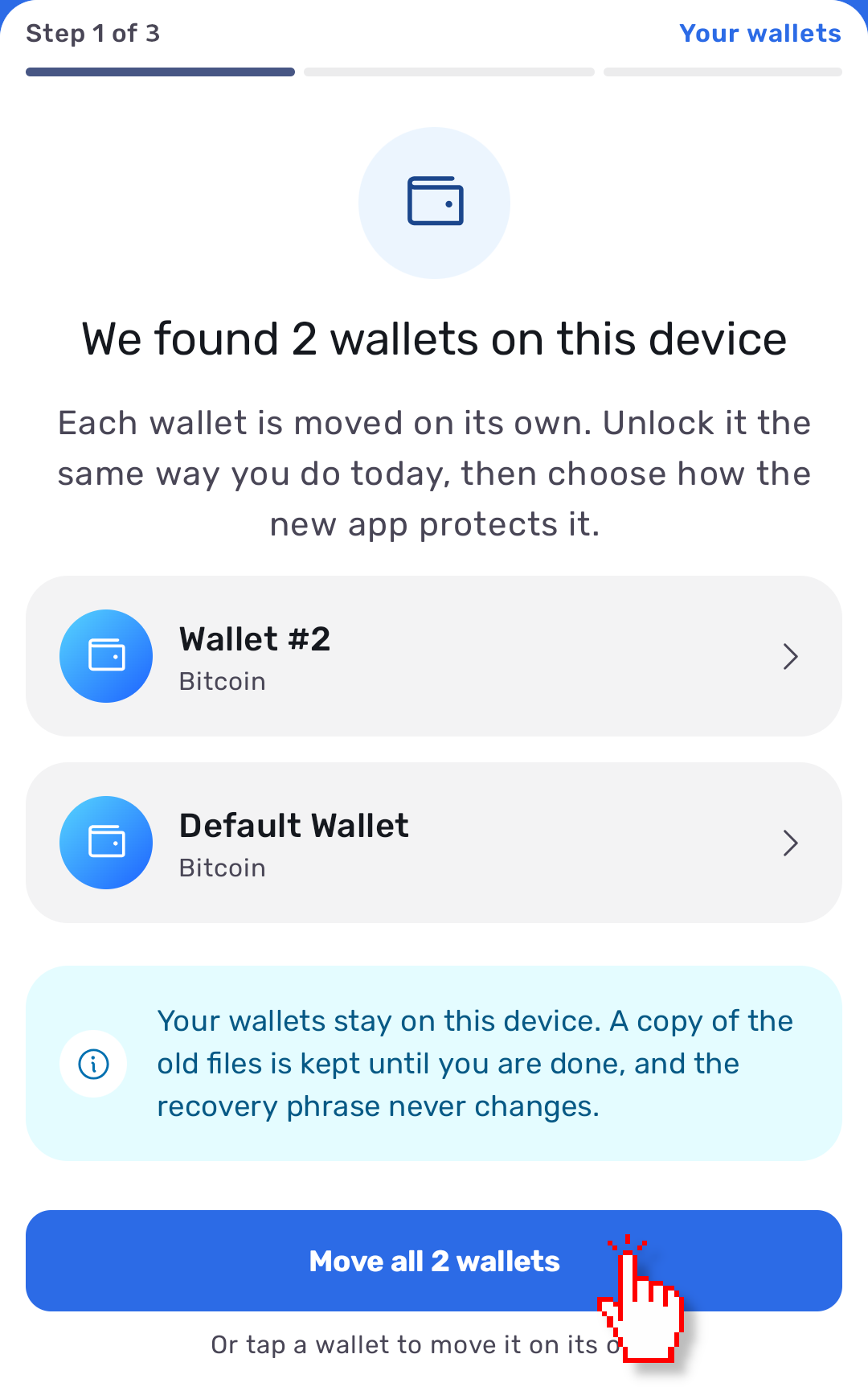
When Coinomi detects wallets that use the previous encryption format, it will guide you through migration.
- Open Coinomi 2.0.0 or later.
The app identifies wallets that need to be migrated. - Choose which wallets to migrate.
If you have multiple wallets, you can migrate them individually or select Move all wallets. Coinomi will go through your wallets and request the appropriate authentication for each one. - Authenticate each wallet.
Coinomi asks you to unlock each wallet using your biometrics, password or password+biometrics. This is the same authentication you used in previous versions of Coinomi, and it will be preserved after migration. - Complete the migration.
Coinomi re-encrypts the wallet information using the new format while preserving the existing wallet and its settings. - Continue using your wallets.
Your accounts, addresses, and balances remain unchanged.
| 
|
2. What stays the same after migration?
Almost everything is preserved. The migration updates the encryption format used by Coinomi, not your wallet identity or cryptocurrency holdings.
| Wallet information | After migration |
|---|
| Recovery phrase | Unchanged |
| BIP39 passphrase (extra word) | Unchanged |
| Wallet password and authentication | Unchanged |
| Added coin accounts | Preserved |
| Wallet addresses | Unchanged |
| Cryptocurrency balances | Unaffected |
| Local encryption and storage handling | Updated |
| App lock | Must be re-enabled |
3. Verify your recovery phrase backup
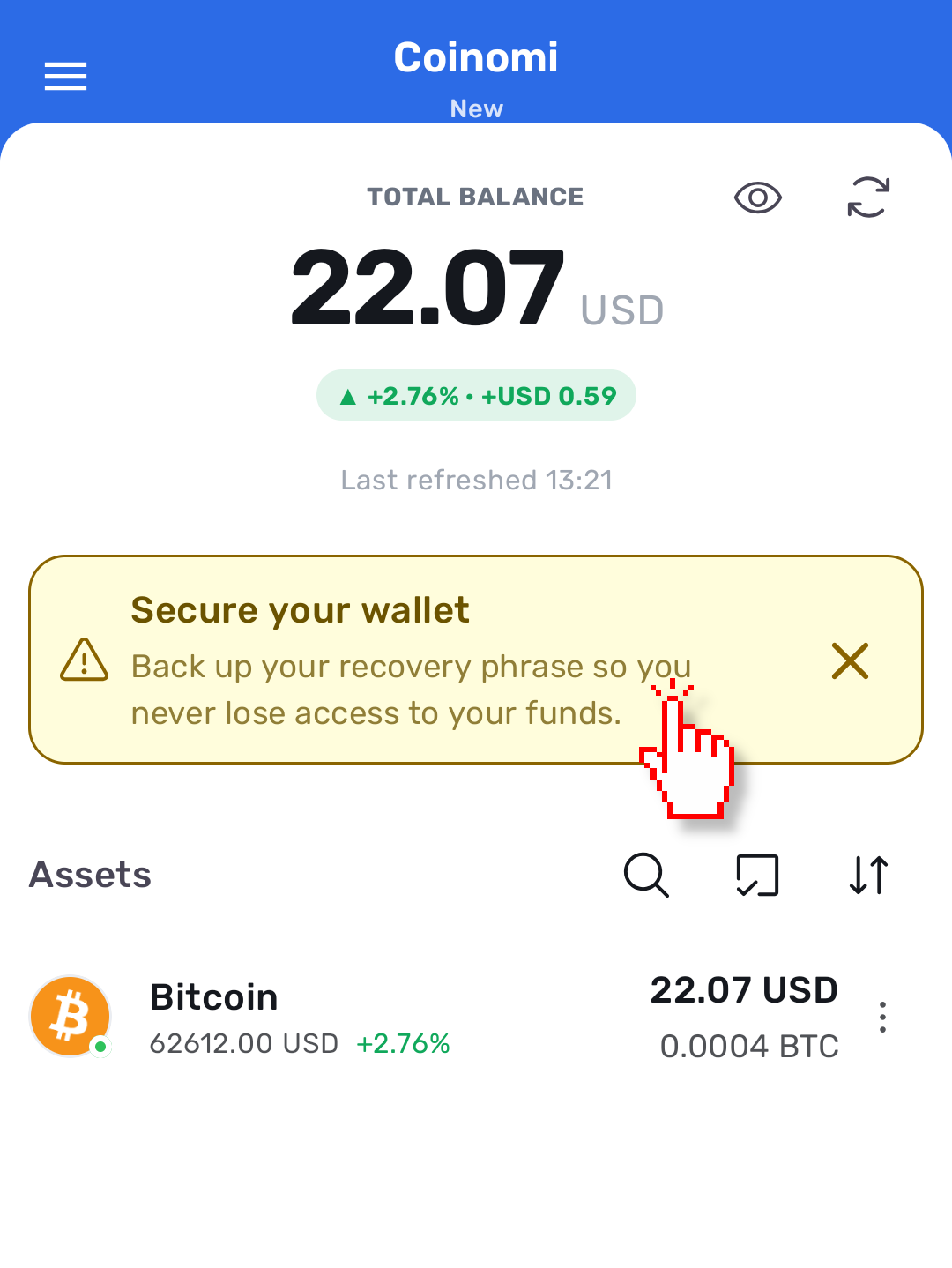
After migration, Coinomi displays a backup reminder to encourage you to confirm that your wallet recovery phrase is safely stored.
Although your recovery phrase has not changed, this is a good opportunity to verify that you still have a correct, complete backup.
- Follow the backup reminder shown in Coinomi.
- Verify that your recovery phrase is recorded correctly, in the original word order.
- Store your backup securely offline, preferably written on paper and kept somewhere safe.
- If you use a BIP39 passphrase, make sure you have also securely backed it up.
- Complete the backup confirmation in Coinomi.
| 
|
The backup reminder disappears once completed
After you confirm your wallet backup, Coinomi removes the backup warning banner for that wallet
Your recovery phrase is essential.
If your device is lost, damaged, or reset, your recovery phrase is needed to restore your wallet. If your wallet uses an additional BIP39 passphrase, you must also know that exact passphrase to recover the same addresses and funds. Read more here: How can I back up/restore my wallet?
Frequently asked questions
Do I need my recovery phrase to migrate?
No. Normal migration uses your existing wallet authentication method, just as you would use it to authorize a transaction in the previous version.
Your recovery phrase is needed if you can no longer unlock the wallet and must restore it instead.
I'm being asked for my BIP39 passphrase, but I don't have it. What should I do?
Select "I don't have this" to continue migration without entering the BIP39 passphrase.
Your wallet will continue working as before, with the same accounts, addresses, and funds.
However, if you've forgotten a BIP39 passphrase that was used to create your wallet, you will not be able to restore the same wallet in the future using the recovery phrase alone. We strongly recommend creating a new wallet with a securely backed-up recovery phrase and transferring your funds while you still have access.
My device's keystore was invalidated before updating. Will migration fix it?
No. Migration cannot repair a device keystore that was already invalidated before the update. You will need to restore your wallet using its recovery phrase and, if applicable, the original BIP39 passphrase.
I have multiple wallets. Can I migrate them all together?
Yes. You can migrate wallets individually or select Move all wallets. When moving all wallets, Coinomi will request the existing authentication method for each wallet as it processes them.
Why has my app lock disappeared?
App-lock settings from the previous Coinomi version are not migrated. You can set up a new app lock after confirming the recovery phrase backup for every wallet in the app.
Why can't I enable app lock yet?
Coinomi requires backup confirmation for every wallet before enabling app lock. Complete the backup reminders first, then return to Settings to configure your app lock.
Why am I seeing a backup warning after migration?
Coinomi is reminding you to verify that your recovery phrase is safely stored offline. Your phrase hasn't changed. Once you complete the backup confirmation, the warning banner disappears.
Will migration change my wallet addresses or balances?
No. Your wallet addresses, added coin accounts, recovery phrase, and cryptocurrency balances remain unchanged. Migration does not transfer any funds.
Do I need to create a new wallet password?
No. Your existing wallet password and authentication settings remain unchanged. The only exception discussed in this guide is the separate app-lock feature, which must be configured again if you want to use it.
What if I have forgotten my wallet password?
If you cannot authenticate using the method configured for your existing wallet, you may need to restore it using your recovery phrase. If the wallet was created with a BIP39 passphrase, that exact passphrase is also required.
Is migration a one-time process?
Yes. Each existing wallet only needs to be migrated once from the previous encryption format to the format used by Coinomi 2.0 and later.
Important security reminders
- Migration does not replace the need for a secure recovery phrase backup.
- Store recovery phrases offline, preferably on paper, and keep them somewhere secure.
- Remember that a BIP39 passphrase is separate from your recovery phrase and must also be preserved if used.
- Do not uninstall Coinomi or clear its app data unless you are confident you can restore all your wallets.
- Never share your recovery phrase, BIP39 passphrase, or wallet passwords with anyone.
Need help migrating your wallets?
Contact Coinomi Support with your device type, app version, and any screenshots to help explain the issue you need help with.
Coinomi Support will never ask for your recovery phrase, BIP39 passphrase, or private keys.
